
You can securely view your full card number, expiry date, and CVV from the card detail page. This is useful for virtual cards when making online purchases.
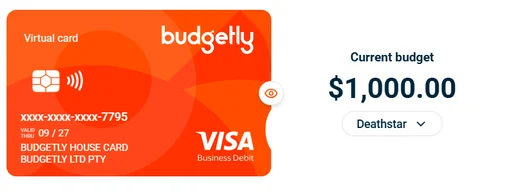
Note: If no eye icon appears on your card image, it’s a physical card. Physical card details can only be viewed on the card itself — they cannot be revealed online.
| Detail | Where to find it |
|---|---|
| Last 4 digits | Visible on the card image by default |
| Full card number, expiry, CVV | Click the eye icon on the card image to reveal |
| Current budget | Shown to the right of the card image |
How to view your card details on desktop
- Click Cards in the sidebar.
- Select the card you want to view.
- On the card detail page, find the card image showing your card’s last 4 digits.
- Click the eye icon on the card image to reveal your full card number, expiry date, and CVV.
Important: Your full card details are displayed securely through a verified channel. Keep your card number, expiry, and CVV private at all times.
How to view your card details on mobile
- Open the Budgetly app and tap Cards.
- Swipe to the card you want to view.
- Tap the eye icon on the card image to reveal your full details.
Common questions
Can I copy my card number from the details view?
Yes. Once revealed, you can copy the card number, expiry, and CVV for pasting into online checkout forms.
How long do the details stay visible?
The full details are shown temporarily. They hide again after a short period or when you navigate away from the page.
Can an admin see my full card details?
No. Full card details (number, expiry, CVV) are only visible to the cardholder through the secure viewer.