
The CVV is the 3-digit security code on your physical Budgetly Visa card, used to confirm you’re holding the card when you pay online or over the phone.
Note: This applies to physical cards. To find the CVV on a virtual card, tap the eye icon on the card image — see How to view your full card details.
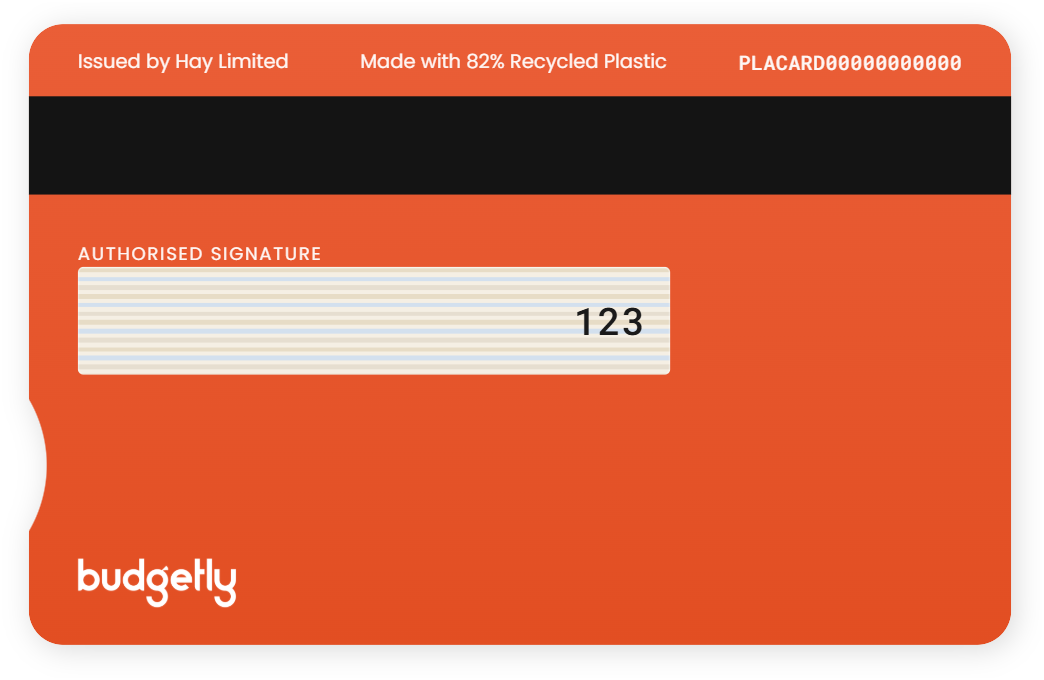
Where the CVV is on your card
- Turn your physical card over to the back.
- Find the signature strip (the striped panel below “Authorised signature”).
- Read the 3-digit number printed at the right-hand end of the strip — that’s your CVV.
Important: Keep your CVV private. Only enter it on trusted checkout pages, and never share it by email or message.
Common questions
What is a CVV?
The CVV (Card Verification Value) is a 3-digit code that proves you physically have the card. Online and phone payments ask for it as an extra security check.
Is the CVV the same as my card PIN?
No. Your PIN is a 4-digit number you set for in-store payments and ATMs. The CVV is a fixed 3-digit code printed on the card for online and phone payments.
My payments keep getting declined after I enter the CVV
Entering the wrong CVV three or more times locks the card. You can unlock it yourself — see How to unlock your card after incorrect CVV attempts.
Where's the CVV on my virtual card?
Virtual cards don’t have a printed code. Open the card in Budgetly and tap the eye icon on the card image to reveal the full number, expiry, and CVV.