
You can edit several properties on a transaction to help with tracking and reconciliation. If AI Bookkeeping has applied a value, you can confirm or correct it using the feedback controls.
| Editable field | Who can edit | Notes |
|---|---|---|
| Receipt | User or Admin | Upload or replace the attached receipt |
| GST | User or Admin | Manually enter or correct the GST amount |
| Budget | Admin | Reassign the transaction to a different budget |
| Category | User or Admin | Assign or change the spending category |
| Tags | User or Admin | Add custom labels |
| Notes | User or Admin | Add internal notes for context |
How to edit a transaction
- Click Transactions in the sidebar.
- Select the transaction you want to edit by clicking the merchant name.
- Make your changes on the edit form.
- Click Save transaction.
Important: Editing a transaction in Budgetly does not update the transaction in Xero. If the transaction has already been synced, update it in Xero separately.
Giving feedback on AI-applied values
When AI Bookkeeping applies a category, tag, or GST value, you’ll see a green asterisk (✱) next to it and thumbs up/down feedback icons in the transaction details.
- Open the transaction and navigate to the field with the AI indicator.
- Tap thumbs up to confirm the value is correct (one click, done).
- Tap thumbs down if the value is wrong — your feedback records immediately. An optional comment dialog opens so you can add context, but closing it doesn’t undo the feedback.
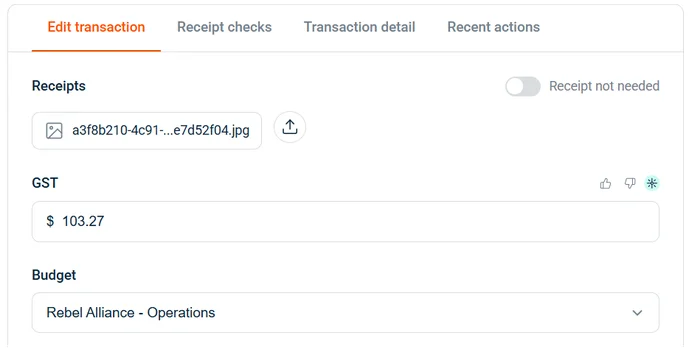
Your feedback is captured for future accuracy improvements. It doesn’t change the agent’s behaviour in real time.
Tip: Editing an AI-set value to something different automatically records it as a correction. The value flips to manually-set and the AI indicator disappears.