
AI Bookkeeping reviews every new card and bill transaction and automatically applies categories, tags, and GST when it’s confident in the result. It also checks receipts on card transactions for accuracy.
| Capability | What it does |
|---|---|
| Categorisation | Applies a category based on transaction patterns |
| Tagging | Applies tags across your active tag groups |
| GST extraction | Reads GST amounts from uploaded receipts |
| Receipt checks | Verifies receipts on card transactions (merchant match, date, itemisation, GST) |
Important: AI Bookkeeping is available on all plans (Essentials, Premium, and Enterprise). Pricing is usage-based — see budgetly.com.au/pricing for details.
How it works
AI Bookkeeping evaluates each transaction at the moment it’s created. It draws on:
- The transaction data (amount, merchant, budget)
- Your company’s categories, tag groups, and budget defaults
- Historical patterns from previously categorised transactions in your company
When the agent is confident in its prediction, it applies the value automatically. When it’s not confident enough, it stays silent — it won’t guess.
Tip: The agent learns from your company’s own transaction history. The more transactions your team categorises correctly, the more accurate it becomes over time.
On bills
When you set a supplier on a bill, AI Bookkeeping selects the budget and category for you, marked with an agent icon. Change either value and the icon clears, just like on transactions. Once the bill is paid, its payment flows through AI Bookkeeping the same way card transactions do, so categories and GST stay consistent across your books.
How to identify AI-set values
AI-applied values appear in your existing transaction list columns alongside manually-set values. You can identify them by the small green asterisk (✱) next to the value.
- In the transaction list — a green asterisk appears next to AI-set categories, tags, and GST amounts.
- In transaction details — AI-set values show the asterisk indicator and a “Train your agent” feedback option.
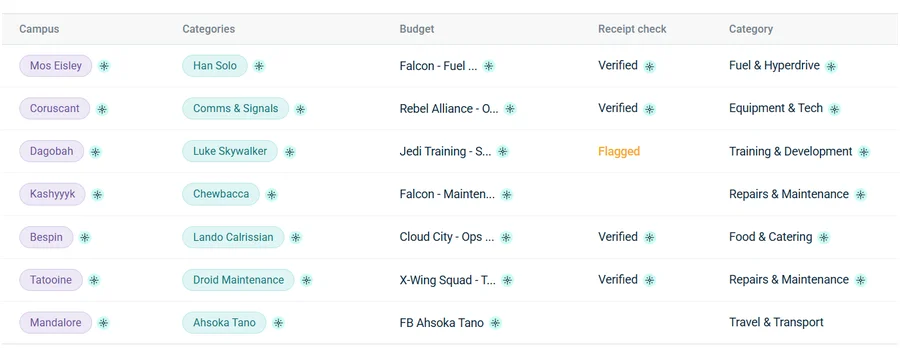
If you manually edit an AI-set value to something different, it becomes a manually-set value and the AI indicator disappears.
What’s eligible for receipt checks
Receipt checks run on card transactions only. Bills, deposits, and wallet debits are excluded and show no receipt check status.
| Receipt check status | Meaning |
|---|---|
| Verified | The receipt passed all checks |
| Flagged | The receipt failed one or more checks — review needed |
| (empty) | No receipt uploaded, or the transaction type isn’t eligible |
Read the full guide: Understanding receipt checks.
Who can do what
| Role | Access |
|---|---|
| Admin | See AI values, give feedback, verify flagged receipts, manage AI Bookkeeping in Billing |
| Accountant | See AI values, give feedback, verify flagged receipts |
| User | See AI values, give feedback |
Why the agent didn’t categorise a transaction
If a transaction doesn’t have an AI-applied category, it means the agent wasn’t confident enough to act. This is by design — it only applies values when it’s sure, to avoid errors in your books.
Common reasons:
- New merchant the agent hasn’t seen before
- Ambiguous merchant that could map to multiple categories
- Not enough historical data in your company yet
As your team categorises more transactions, the agent builds a stronger picture of your patterns.