
Statements provide a summary of all transactions for a Spend Account over a given period. You can download monthly statements or create custom date-range statements.
| Monthly | Custom | |
|---|---|---|
| Period | Calendar month | Any date range you choose |
| Generated | Automatically at month end | On demand when you click Generate |
| Best for | Regular reconciliation | Ad-hoc reporting, audits, specific periods |
How to access statements
- Click Statements in the sidebar.
- Choose the account you want statements for:
| Account | Description |
|---|---|
| Spend account | Your current active account — all card transactions |
| Bills account | Historical bill payment data (pre-migration) |
| Cards account | Historical card transaction data (pre-migration) |
Note: The Bills and Cards accounts contain historical data from before the platform migration and are read-only.
Monthly statements
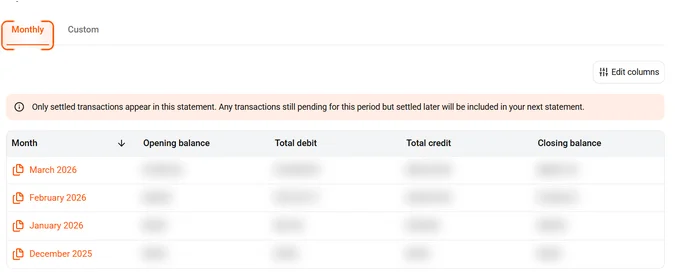
- Navigate to the Monthly tab on the Statements page.
- Find the month you need from the list.
- Click the download icon next to it.
Tip: Monthly statements are available on the 1st of each month and only include settled transactions. If a purchase is still pending on the last day of the month, it will appear on the next month’s statement instead.
Custom statements
- Select the Custom tab on the Statements page.
- Click the Date filter and choose a date range, then click Apply filter.
- Optionally, click the User filter to narrow results to a specific user, then click Apply filter.
- Optionally, click the Budget filter to narrow results to a specific budget, then click Apply filter.
- Click the Export button in the top right to download the statement.
Tip: You can combine all three filters (Date, User, Budget) to generate a highly specific statement. Use Clear filters to reset and start over.
Common questions
Can I download statements for a specific budget?
Statements are generated per Spend Account, not per budget. To see transactions for a specific budget, use the CSV export with a budget filter.
What format are statements downloaded in?
Statements download as PDF files.
Can my accountant access statements?
Yes. Users with the Accountant role can log in and download statements from the Statements page.