
The Preferences tabs on the Company page let you control company-wide settings for automation, cards, bills, and account alerts.
How to access preferences
- Open Settings in the sidebar.
- Select Company.
- Navigate to the Preferences tabs (General, Cards, Bills, or Accounts).
General tab
- Enable GST extraction — automatically extract GST amounts from uploaded receipts. Available on Premium plans and above.
Cards tab
- Block card ordering — prevent users (not admins) from ordering new cards.
- Block ATM withdrawals — block all users from withdrawing cash at ATMs. You can also block ATM withdrawals per user.
Bills tab
- Set auto-approval limit for bills — enter the maximum bill amount users can pay without admin approval. Leave blank to allow all payments without approval.
See How to set up bill approval workflows for more detail.
Accounts tab
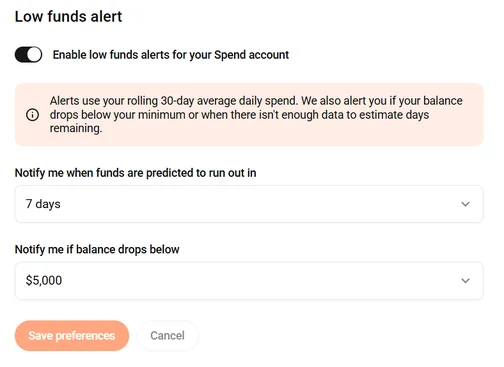
The Accounts tab lets you set up Low funds alerts for your Spend Account. Alerts notify admins by email and in-app inbox once per day when your balance is at risk.
- Toggle Enable low funds alerts for your Spend account on.
- Notify me when funds are predicted to run out in — choose a timeframe (e.g. 7 days). Budgetly uses your rolling 30-day average daily spend to estimate how long your balance will last.
- Notify me if balance drops below — choose a minimum balance (e.g. $5,000). You will be alerted if your balance falls below this amount.
- Click Save preferences.
Note: If your account has less than 30 days of spend history, only the minimum balance alert applies.
Common questions
Does company-wide ATM blocking override per-user settings?
Yes. If ATM is blocked company-wide, enabling it per-user has no effect. See How to enable or disable ATM withdrawals.
Can I set different preferences for different users?
Some preferences (like ATM access and notifications) can be set per user on Premium plans. Company-wide settings apply to everyone.
Who can change company preferences?
Only admins can access and edit company preferences.