
You can issue a card when setting up a new user, or at any time from the Cards page.
Physical and virtual cards
| Feature | Virtual card | Physical card |
|---|---|---|
| Format | Digital only | Plastic card mailed to you |
| Use | Online purchases (in-store via mobile wallet) | In-store (tap or insert), online, ATM, and via mobile wallet |
| Delivery | Instantly available | 3–15 business days (standard post) |
| Security | Can’t be lost or stolen — add to Apple or Google Wallet for biometric protection (Face ID, fingerprint) on every tap | Can be lost or stolen — freeze instantly from the app if needed |
- Virtual cards can be used in-store if added to Apple Wallet or Google Wallet.
How to issue a card
- Click Cards in the sidebar.
- Select the New card button at the top right.
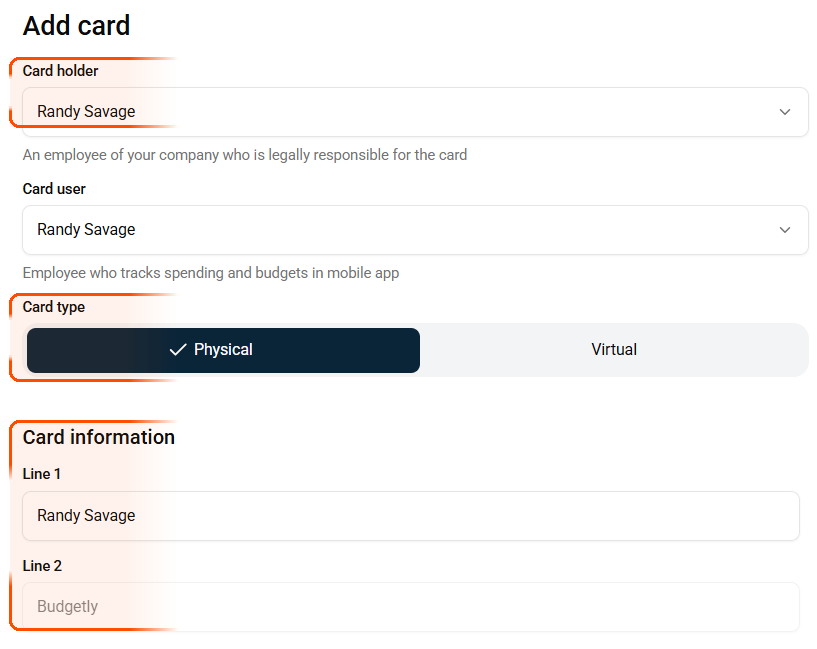
- Choose the Card holder — the user who will receive the card.
- If enabled, you can assign a different Card user — the person who will use the card day-to-day.
- Pick Virtual or Physical card type.
- Enter the card information:
- Line 1 — the name displayed on the card (typically the cardholder’s name).
- Line 2 — your legal business name (this cannot be edited).
- Click Add card.
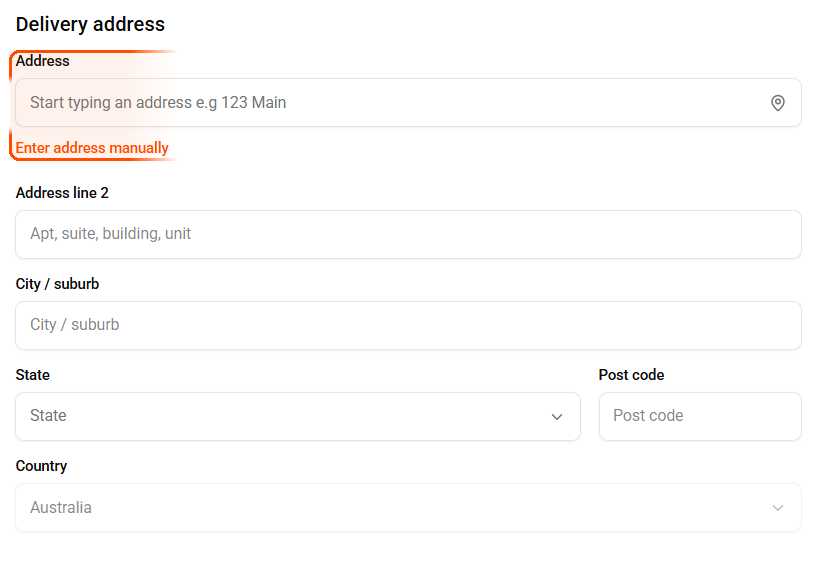
When choosing a physical card, you’ll also need to provide a delivery address:
- Start typing in the Address field and select from the suggested results. Alternatively, click Enter address manually to fill in the fields yourself.
- All physical cards are sent via Standard delivery (3–15 business days via AusPost).
Common questions
How much does it cost to issue a card?
Physical cards cost $10.00 plus $3.00 standard postage. Virtual cards cost $5.00. Both are one-off issuing fees.
Can a user have more than one card?
Yes. There’s no limit on the number of virtual and physical cards a user can have.
How long does a physical card take to arrive?
3–15 business days via AusPost standard delivery.