
Archiving a budget removes it from your active list without deleting it. Old or unused budgets stay accessible if you need them later.
| Status | What it means |
|---|---|
| Approved | Budget is live — users can spend from it |
| Paused | Spending is temporarily blocked — can be resumed |
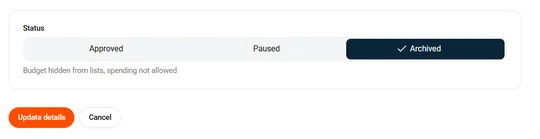
| Archived | Removed from the active list — no spending, but data is retained |
How to archive a budget
- Click Budgets in the sidebar.
- Select the budget you want to archive.
- Click Edit budget in the top right.
- Scroll to the Status section at the bottom.
- Choose Archived.
- Click Update details.
Important: Archiving stops all spending from the budget. Cards linked to it won’t be able to make purchases until they’re moved to another budget.
Common questions
Can I unarchive a budget?
Yes. Edit the archived budget and change the status back to Active. It returns to your active list immediately.
What happens to cards linked to an archived budget?
Cards linked to the budget can no longer spend from it. Reassign them to another budget or they’ll have no active budget.
Can I delete a budget instead of archiving it?
No. Budgets can’t be permanently deleted. Archiving is the way to remove them from your active list while keeping the transaction history.