
Your Spend Account is the wallet that holds your company’s funds for card spending and bill payments.
Who can open the Spend Account
Only the authorised signatory or a Budgetly admin can complete these steps.
Note: If you’re a regular user, you’ll see a message on your Dashboard asking you to wait for the authorised signatory to finish.
How to open your Spend Account
Important: Compliance verification may take a few business days depending on your business type. You’ll be notified once it’s complete.
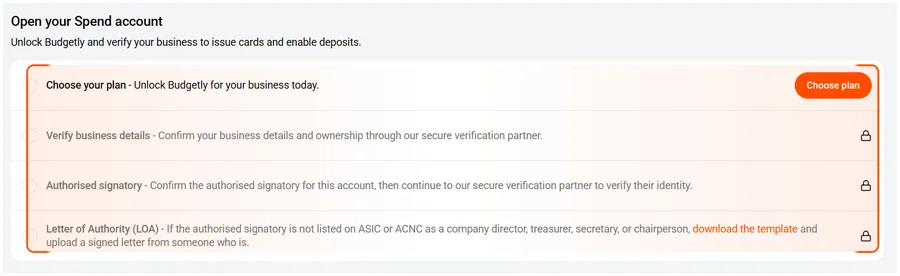
| Step | Action | Notes |
|---|---|---|
| 1 | Choose plan | Select Essentials, Premium, or Enterprise |
| 2 | Verify business details | Confirm your business details and ownership |
| 3 | Authorised signatory | Verify the signatory’s identity |
| 4 | Letter of Authority (if required) | Only if the signatory is not listed on ASIC or ACNC as a director, treasurer, secretary, or chairperson |
- Click Choose plan to select your Budgetly plan.
- Complete Verify business details to confirm your business details and ownership.
- Confirm the Authorised signatory and verify their identity.
- If required, download the Letter of Authority (LOA) template and upload a signed copy.
What happens next
Once your Spend Account is open:
- The Funds section appears on your Dashboard showing your balance.
- You can now issue cards to your team.
- You can deposit funds once you’ve verified a bank account.
Common questions
How long does it take to open my Spend Account?
Most accounts are verified within 1–3 business days. Complex business structures (trusts, associations) may take longer.
Can I use Budgetly while waiting for my Spend Account?
Partially. You can add users and create budgets, but you can’t issue cards or deposit funds until the Spend Account is open.
Do I need a Letter of Authority?
Only if the authorised signatory is not listed on ASIC or ACNC as a director, treasurer, secretary, or chairperson. Most companies won’t need one.