
You can add more than one business to your Budgetly account and switch between them.
Important: Each business has its own Spend Account, users, budgets, and cards. Adding a second business does not share data between them.
| Shared across businesses | Separate per business | |
|---|---|---|
| Login | ✓ Same email and password | |
| Spend Account | ✓ Own balance | |
| Users | ✓ Own user list | |
| Budgets & cards | ✓ Own budgets and cards | |
| Billing | ✓ Own subscription and invoices |
How to add a second business
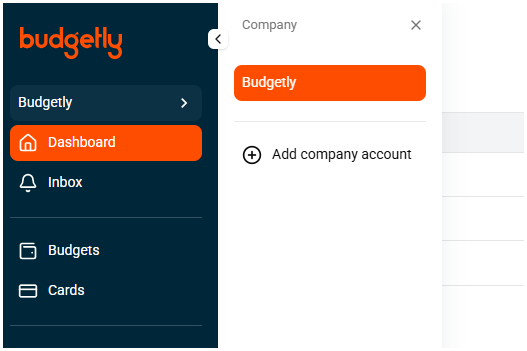
- Click your company name in the sidebar (e.g. “Budgetly” with the
>arrow). - Select Add company account from the Company panel.
- Complete the onboarding steps for the new business:
- Business entity type
- Business details (name, ABN)
- Business address
- The new company will go through the standard compliance verification process.
Switching between businesses
Once you have multiple companies, use the company switcher in the sidebar to move between them. See Switch company for details.
Common questions
Can I move users between my businesses?
No. Each business has its own user list. You’ll need to add the user separately to the second business.
Do I need a separate subscription for each business?
Yes. Each business has its own plan and billing. You can choose different plans for each.
Is there a limit to how many businesses I can add?
No limit. You can add as many businesses as you need under the same login.