
You can deposit funds into your Budgetly Spend Account using PayID or a standard bank transfer.
Important: You must have a verified bank account before making any deposit. Funds from unverified accounts will not be accepted.
| PayID | Bank transfer | |
|---|---|---|
| Speed | Usually instant (first transfer may take up to 3 days) | Up to 3 business days |
| Setup | Paste the Budgetly PayID email as payee | Add BSB and Account Number as payee |
| Best for | Regular top-ups, urgent deposits | Banks that don’t support PayID |
How to find your deposit details
- Click Accounts in the sidebar.
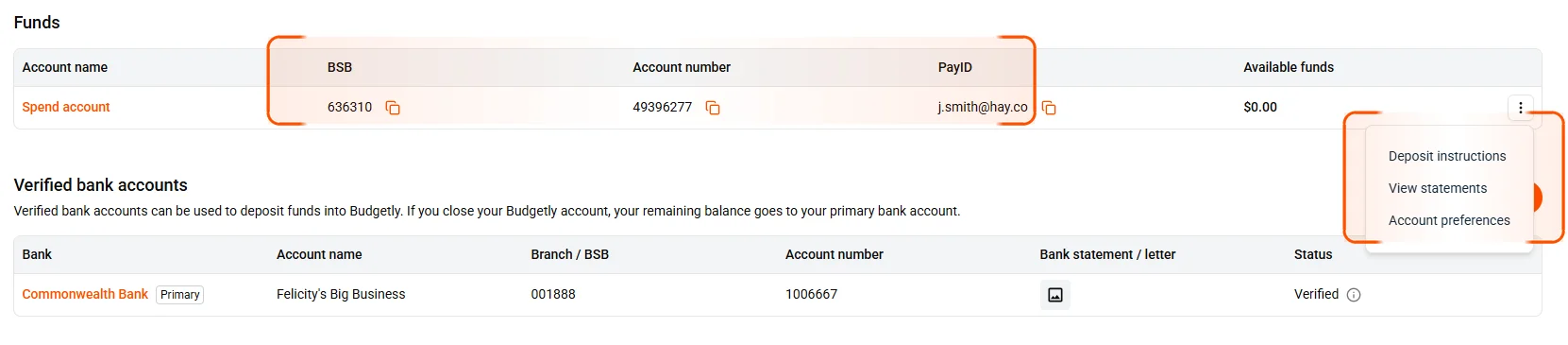
- In the Funds section, your PayID, BSB, and Account number are displayed in the table. Click the copy icon next to any value to copy it.
- Alternatively, select the ⋮ menu on the right and choose Deposit instructions for full deposit details.
Option 1 — PayID (recommended)
PayID is the fastest way to deposit. Most transfers arrive within minutes.
- Log in to your business bank’s online portal.
- Add a new payee and choose PayID (or Pay via email, depending on your bank).
- Paste the Budgetly PayID email address you copied.
- Enter the amount and confirm.
Note: The first PayID transfer may take up to 3 business days to clear. After that, transfers are usually instant.
Option 2 — Bank transfer
- Log in to your business bank’s online portal.
- Add a new payee using the Account name, BSB, and Account number from the Funds table.
- Enter the amount and confirm.
Note: Bank transfers can take up to 3 business days depending on your bank.
How much should I deposit?
Deposit enough to cover all of your combined budgets. For example, if you have 3 budgets set to $1,000 each per week, deposit at least $3,000 per week.
You can enable Low funds alerts to get notified before your balance runs out. Go to Settings > Company > Preferences > Accounts to set your preferred warning thresholds. See How to configure company preferences for details.